Product Info
Description
Description Tank Process
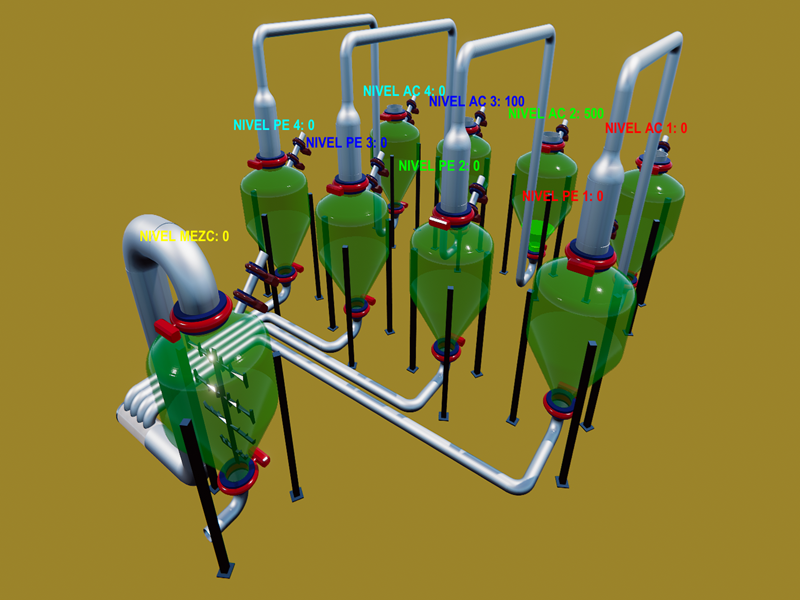
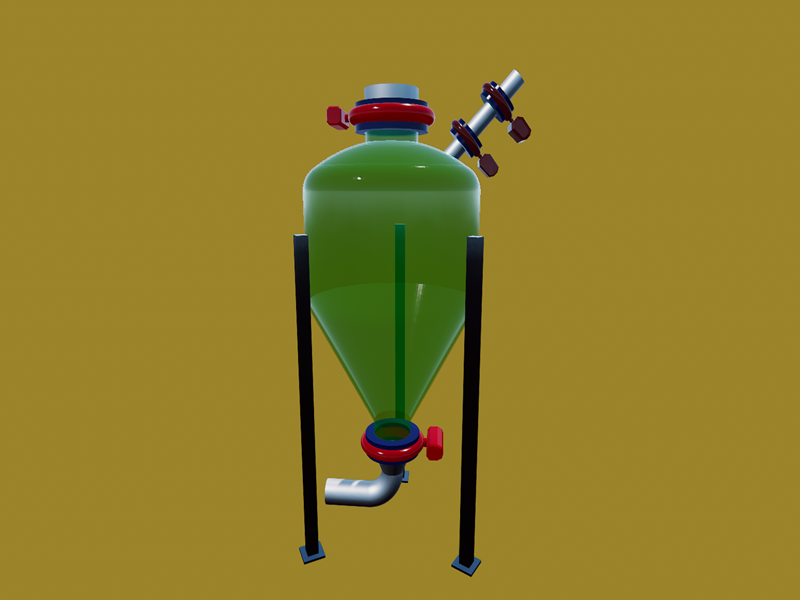
This is a tank-based machine with proportional solenoid valves to fill and empty the tanks at the required speed.
In general, it uses the Tank Process UDC.
Each tank must be configured according to the following parameters:
Tank capacity (for example, 100,000 liters)
Liquid color (Red, Green, and Blue, from 0 to 1)
Initial value (Liters in the tank at machine startup, from 0 to the tank capacity)
We must configure the analog input number where we will read the level.
In addition, the analog output numbers where we will set the speeds:
Input speed Output speed
The machine has three groups of tanks:
1 Storage tanks:
We have 4 nurse tanks, that is, where the liquid is accumulated so that it can be dosed from these tanks to the dosing tanks.
2 Weighing tanks:
We have 4 weighing tanks, where the liters of each component to be mixed are controlled.
Each weighing tank is fed by the corresponding storage tank.
All weighing tanks are destined for the mixing or mixing tank.
3 Mixing tank:
We have a single tank where the quantities dosed in the weighing tanks are mixed.
This mixing tank has blades that mix or stir the liquid.
These blades operate automatically, meaning that when the mixing tank contains liquid, the blades rotate, while if it is empty, the blades stop.
The process is as follows:
1. Sufficient material is stored in the storage tanks.
2. The quantity of material for each liquid to be prepared is decided.
3. The weighing tanks are filled while the storage tanks are emptied at the same speed so that the liquid is transferred to the required amount in each tank.
4. As each liquid is dosed, the corresponding tank is emptied into the mixing tank.
5. Once all the weighing tanks have been emptied, the mixture is allowed to homogenize in the mixing tank.
6. After this time, the mixing tank is emptied.This machine does not use any digital signals, only analog ones.
To perform this process, we have the following analog inputs and outputs:
a. Analog Outputs:
1. Stockpile 1 Filling Speed
2.Stockpile 1 Emptying Speed
3.Stockpile 2 Filling Speed
4.Stockpile 2 Emptying Speed
5.Stockpile 3 Filling Speed
6.Stockpile 3 Emptying Speed
7.Stockpile 4 Filling Speed
8.Stockpile 4 Emptying Speed
9. Weighing 1 Filling Speed
10.Weighing 1 Emptying Speed
11.Weighing 2 Filling Speed
12.Weighing 2 Emptying Speed
13.Weighing 3 Filling Speed
14.Weighing 3 Emptying Speed
15.Weighing 4 Filling Speed
16.Weighing 4 Emptying Speed
17. Mixer Filling Speed
18. Mixer Emptying Speed
b. Analog Inputs:
1. Storage Tank Level 1
2. Storage Tank Level 2
3. Storage Tank Level 3
4. Storage Tank Level 4
5. Weighing Tank Level 1
6. Weighing Tank Level 2
7. Weighing Tank Level 3
8. Weighing Tank Level 4
9. Mixer Tank Level
By acting on each analog output, we must control the process externally.
For example, we have the demo program, created in script code in Machines Simulator, which includes data collection of the levels to be dosed from each tank, as well as a button to start loading.
Please note that the number of analog inputs must be configured in the configuration.
Includes
Includes
Tank Process Machine
Tank Process UDC
Various OBJs for tanks, pipes, etc.
Installing Instruction
1. Download the file.
2. Unzip it
3. Copy the ProcesoTanques.pck file in your Machines Simulator4 -> My machines Folder
(By default C:Nirtec -> Machines Simulator 4 -> MyMachines)
4. Open Machines Simulator editor, go to File -> Unpack Machine. Select ProcesoTanques.pck anc click Load Button.
5. Now the machine scene and UDC will be available in your library.
Dependences
None

Tank Process
This is a tank-based machine with proportional solenoid valves to fill and empty the tanks at the required speed to the desired levels.
This machine can be used for dosing liquids and mixtures.
Original price was: 10,00 €.5,00 €Current price is: 5,00 €.
MS Minimun Required Version: v4.4